Choosing an ergonomic office chair is less about buying the most adjustable product on the market and more about matching a handful of adjustments to your body and how you actually work. Every user has different needs based on height, weight, posture, and work habits, which is why adjustability—from armrests and tilt tension to backrest angle and seat position—matters more than any single design, as seating manufacturer BodyBilt explains. If you sit for eight or more hours a day, struggle with lower back discomfort, or carry tension in your neck and shoulders, the features you prioritize should differ accordingly.
Understanding Ergonomic Chair Features for Your Needs
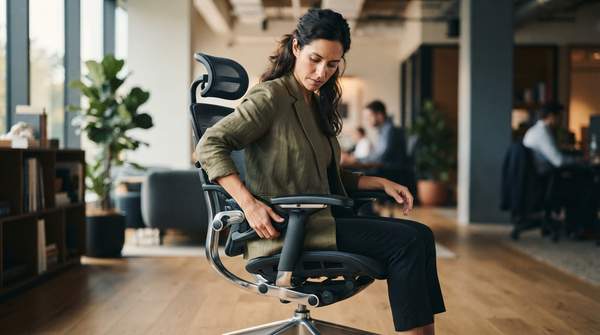
Ergonomic office chairs are designed to accommodate the human body's needs, promoting comfort and supporting natural movement throughout the day. Key adjustable features, including lumbar support, seat height, armrests, and tilt, are essential for users to maintain better posture and reduce stress on the spine. This is particularly important for individuals who sit for extended periods, as ergonomic design can help mitigate common workplace complaints like back pain, shoulder tension, and tech neck.
The starting point is honest self-assessment. Someone who sits for two or three hours at a time may have very different needs from someone who spends eight or more hours at a desk, and a dedicated home office setup requires different considerations than a shared or hybrid workspace, as seating manufacturer Humanscale puts it in its selection guide. Before comparing chairs, ask how many hours you sit, what tasks dominate your day, and how often you change posture.
Ergonomic Chair Feature Prioritization Framework
Use the framework below to diagnose your primary situation or complaint and immediately see which features deserve the most scrutiny when you compare chairs. The mapping follows the biomechanical logic that each situation places a specific stress on the body, and each adjustment exists to counteract it.
| Your Situation or Complaint | Priority Features | Why It Matters |
|---|---|---|
| Sitting 8+ hours per day | Extensive overall adjustability, recline/tilt with dynamic movement | Prolonged sitting demands a chair that supports posture changes rather than locking you in one position, reducing sustained stress on the spine. |
| Lower back discomfort | Adjustable lumbar support | Lumbar support maintains the natural curve of the lower spine; the key is whether it matches your lower back, whether via an adjustable mechanism or a well-designed fixed curve. |
| Neck / shoulder tension | Adjustable armrests | Armrests that support the forearms keep shoulders relaxed and prevent upper-body strain—a small feature with outsized impact on posture. |
| Smaller (or larger) body frame | Seat depth adjustment, wide seat height range | Depth adjustment lets your back rest against the backrest while leaving a gap between the seat edge and the backs of your knees, preventing thigh pressure and ensuring full back support. |
| Fixed-height desk | Seat height and armrest fine-tuning | When the work surface cannot move, the chair must absorb all the adjustment needed to align your body with the desk. |
Read the table as a checklist generator: your top row defines the non-negotiables, and the remaining rows become secondary filters. A long-hours sitter with back pain, for instance, should reject any chair without both a recline mechanism and lumbar support before even considering upholstery.
Essential Adjustable Features Explained
Seat height. Adjust the seat so your feet rest flat on the floor with knees at roughly a 90-degree angle, or slightly lower than your hips. This position supports proper leg circulation and reduces pressure on the thighs. When the workstation desk is at a fixed height, the seat—and any available footrest—becomes the primary tool for aligning your body to the work surface, per guidance from the Canadian Centre for Occupational Health and Safety.
Lumbar support. The support should follow the inward curve of your lower back. It can come from an adjustable mechanism or a well-designed fixed curve; either works if the shape matches your spine, and neither does if it doesn't.
Seat depth. A thick cushion may feel comfortable for the first few minutes but create pressure points if the seat depth doesn't match your proportions. A properly sized seat with moderate cushioning provides more consistent support across the whole workday—so evaluate seat fit and adjustability before judging a chair by how soft it feels initially.
Armrests. Armrests should be adjustable, and most ergonomic chairs make them so. Set them so your shoulders stay relaxed and your forearms rest parallel to the floor. A standards overview citing the BIFMA G1-2013 and CSA-Z412-17 guidelines gives an armrest height range of roughly 7.1 to 9.8 inches (18.0–25.0 cm) measured from the compressed seat height—useful as a benchmark for whether a chair's range can actually reach your neutral position.
Recline and tilt. Locking the backrest in one position is generally not recommended, because it restricts the back support the chair provides. "Research studies confirm the benefits of using chairs that support dynamic sitting rather than encouraging a static posture," as the University of Pittsburgh's Office of Public Safety and Emergency Management notes. Look for recline with tension control rather than a locked-back design.
Secondary Chair Characteristics for a Holistic Choice
Two non-adjustment factors still shape long-term satisfaction. The base: if chair mobility matters to your work, the chair should have at least a five-pedestal base with casters that glide freely over your floor surface—chairs with four casters tip over more easily than those with five or more. The upholstery: vinyl and vinyl-like coverings are easy to clean and spill-resistant but don't breathe, and a seat that heats up under the thighs can accumulate uncomfortable moisture; cloth is the most common covering but is less spill-resistant, harder to clean, and cloth-covered foam can be a significant source of dust-mite allergen. Weigh cleaning and maintenance needs against breathability when choosing between them. An adjustable-tilt seat pan, by contrast, is not an essential feature in most situations.
Making Your Ergonomic Chair Decision
Prioritize ergonomic chair features based on your specific body type, work style, and any existing physical discomforts, then experiment with adjustments to find your optimal fit. Two boundaries keep this decision honest: this is general guidance for standard office desk work, not medical advice, and no specific brand or model is recommended here—specialized seating such as drafting stools and kneeling chairs falls outside this framework. Optimal settings are unique to each individual, so treat published angles and ranges as starting points to test, not fixed answers. The measurable indicator that your choice is right is simple to track: reduced discomfort and improved posture during and after prolonged sitting. If a week of adjusted sitting leaves you with the same aches you started with, return to the framework, re-diagnose your primary complaint, and re-tune the corresponding adjustment.